Friday, July 24, 2020

Life Crafted with Sheree


Hello friends!

One of the things I love about the Life Crafted Kits is how they make it so quick and easy to put a spread together.  Today I have this project to share with you featuring some of the journaling cards, stamps and ephemera pieces from this month's gorgeous "Wild @ Heart" Life Crafted Kit…


I was really drawn to the colours, especially the green, in the “LOVE” and “reasons to smile” journaling cards and I thought they co-ordinated so well with my full page photo.

For the “reasons to smile” card I used my typewriter to type out the text strips, cut them out and then adhered them into the spaces on the card.  I then used my sewing machine to stitch across each strip.  By using the strips instead of typing directly onto the card it added layers and texture to the card which is what I love on my projects.


The “LOVE” card is one of my favourites from the kit and I love the combination of colours!  To add some lovely texture to this one I used a paper piercer to create stitching holes in each letter, then hand stitched each letter in matching embroidery thread.  To finish it off I simply added the date using a date stamp from my stash.


For the full page photo I thought it would be fun to add a butterfly with a stitched flight path.  I used a template from my stash to help pierce the curved line (although this could be done freehand too), then used some pink embroidery thread to stitch along to trail.  The butterfly was adhered into place then I used my sewing machine to secure it onto the page.  I love that the wings are still able to lift up creating some dimension.


At the bottom of the large photo, I decided to create an embellishment cluster.  I used the leaf border stamp from the This Is Life “Wild @ Heart” Stamp Set with green ink and white cardstock to create a strip to go along the bottom of the page.  I stamped a phrase from the same set onto a rectangular label, then stamped the word “Weekend” using the Bailey Alphabet, Number, Month Stamp set onto some white cardstock and cut it out to use on the larger pink label.  The labels were then layered together and I also added some hearts and a little green enamel dot.  A little machine stitching helped to finish it all off.


You can see more details in the process video below...


I hope you’ve enjoyed seeing how this project came together!


Thank you for stopping by the blog today!  I look forward to sharing another project with you soon!

Sheree


Thursday, July 23, 2020

Open Post: Life Crafted Pages Ideas with Angela


Hi everyone,
It's Angela back on the blog. I keep filling up my Peony Life Crafted album, documenting my and my family summer. Today, I have a couple of pages to show you that are the continuation of my previous post. You can find the previous pages in the post here.

To vary the style of the pages, I adhered two papers of 4.25" x 8" to an Adhesive Page Strip, cutting off the excess. Then, I scored the papers along the strip so to allow them to open.


Here is the spread opening the pages. The two papers are from Wild At Heart July Life Crafted kit and they are printed on a single side. This allowed me to play freely with the white space.

I am documenting my second visit to the hairdresser after the lockdown. Finally, I had my hair cut. Yeah! It's not easy to go to the hairdresser, now. We have to take an appointment because no more than one person per time is allowed in small salon, like the one where I go. 


I took a few selfies, I should say many, of my hair done and their new gorgeous color and I chose four photos.  Now, it is very hard for me to show myself in my projects. It's different when it's a picture of me and my family but it's hard when it's only me. I guess it is because I am not enough self confident and I do not like to be the protagonist. Whatever is the reason, I forced myself to do it because one of the things on my list is to take more care of myself. 


The spread was inspired by the beautiful big numbers that are in the Exclusive Die-Cut Ephemera pack. I adhered them in the corners and next to each one I placed one photo. Below every photo, I stamped a phrase using the stamps of the kit. I stamped the phrases on a strip of white card-stock and embellished with little pits and pieces like die-cuts and enamel dots.


I placed a fourth photo on the top right corner. I used a slide shaped die-cut with a beautiful phrase that really spoke to me and I embellished with a big pink flower. This is by Pink Paislee and it comes from the July Scrapbooking Add-On kit. 


Thank you so much for stopping by today. I hope you liked this little idea of mine and feel inspired to create with Citrus Twist Wild At Heart kit. Have a great day!


Wednesday, July 22, 2020

Lots of Layers with Shannon


Hey there, scrappy friends! I have a fun new Life Crafted album spread to share with you today. If there is one technique that I love to do over and over again it's layering. I often find that once I start it's hard for me to stop. Anyone else? I mixed and matched the July 2020 "Wild At Heart" Life Crafted Kit and the July 2020 Add-On Kit to create this spread. I also used some Digital Tags and Digital Cutaparts. Did you know that Citrus Twist has a whole page of digital product? Be sure to check it out! Anyway, on to my spread...

I cut the base page to 5x8.25 so I knew this would give me plenty of room on the sides of the photo. I also punched my holes before beginning so I didn't accidentally ruin my design by punching them after the fact. I use a 6-hole punch but you could do it with a single-hole punch and use Citrus Twist page protectors as a guide. I like to do a mix of pages in and out of page protectors in my album. I used plain white cardstock for a clean background because I knew that I'd be incorporating a lot of color.


Like I said, layer upon layers! I went with a 3x3 photo here so I'd have enough room on either side to build out my layers. I also added a white border in Photoshop to give some separation between the photo and the papers. I used 5 pieces of paper behind the photo and cut each one about .25" bigger than the one before it. When building my layers, I try to offset them slightly so it's not perfectly even on all sides. It gives it a bit more visual appeal. When adhering each layer, I try to keep the adhesive away from the edges. This allows me to tuck in embellishments in various places. I actually build everything up on the bottom layer, adhere it all, and then attached the whole piece to my page. That gives me some freedom in placement. Once my layered block was placed, I added a few pieces to the top and bottom edges to pull everything together.


All the layering and colors on the right side meant that I needed to keep the left side pretty simple. I'd been waiting to use that large "2" die cut since my kit arrived. I love how it looks bold but clean against a white background. I used a few pieces of ephemera and some scrap paper at the bottom to create a small cluster. I cut a piece of paper from the July 2020 Add-On Kit to finish off the top of the page. After adding, adding, adding to my layers on the left side, it was actually pretty difficult to keep it simple on the right side!


One final tip about layering. I like to build up my layers completely before adding any adhesive. This lets me make sure I'll like the final product before I make anything permanent. It also lets me see where I might need to add more of a certain shape or color. Moving things around freely is key to ending up with a final product that I love!

I hope I've inspired you to try some layering in your next project. Maybe you'll find that you're like me and you just can't stop once you start! Happy scrapping!


Tuesday, July 21, 2020

Pocket Life Challenge with Amy Jo


Hello everyone!  I'm back with my favourite post of the month, Pocket Page Challenge!  I'm so excited to get you working on your pocket page layouts.  For this month's challenge, I'm going to get you using those big numbers & the puffy alphabet stickers.


I started out with my 1,2,3 and then filled in my photos around the numbers.  The spread was mostly pictures of myself or projects that I was doing around the house and garden, so the "tell your story" card from the ephemera was a great way to get my journaling in.  
I used the puffy stickers to add some black to the spread (always a great idea if it feels too fluffy or like it doesn't have a strong focal point) and the cards were the perfect fit around my photos.  I tried to let the big numbers do most of the work on this spread, they have a great impact, and I right justified them on the card because I preferred that to centered, but you could also easily let them take center stage too!

Thanks for checking out my pocket pages this month, I hope this gets you working on yours!


Sunday, July 19, 2020

Sunday sketch with Marivi


Hello everyone!
Today we are going with this week's sketch, an 8.5x11 layout with several layers of paper.


I have used the Pinkfresh papers that come in this month's Add-on kit, they match great with a couple of photos of my husband working out at home during confinement.

I have cut a long strip of paper as a background and on top I have cut others horizontally to place the photos.


I have added theme related ornaments, stickers and I have also used my sewing machine.


Very easy, I hope you have fun creating your sketch.


Saturday, July 18, 2020

3-to-Inspire with Erica


Hey crafty friends! Erica here and today I am on the blog with your 3-to-Inspire challenge! Today's recipe elements include:

1. Use digital files in creative ways
2. Include a pop culture reference
3. Stamp a bunch 


I'm a big advocate for making the most of your digital files on your physical spreads. Print out all those babies and mix them up with your physical product. I found the perfect card to go with this spread, it just so happened to be one of the Wild at Heart Basic TN Papers. So I brought it into Photoshop and resized it to 3x4 and used the journaling space for a photo instead.


A lot of my current weeks deal with documenting a stressful unplanned house renovation, so I never want to miss the chance to include some of the fun pop culture things that make me smile. I look forward to Star Wars day every year. I took a screen shot of one of my favourite SW artists to celebrate the day and stamped a title using the Bailey alpha. 


And the last element is to include more stamping! Stamp quirky phrases onto your cards and make those sentiments your own. Stamp in the negative space on your photos. Or stamp on labels and layer them with banners and flags from the digital cutaparts. The possibilities are endless.


Thanks for joining me on the blog today! I hope you give these recipe elements a go on a crafty project.


Friday, July 17, 2020

Life Crafted with Krystal


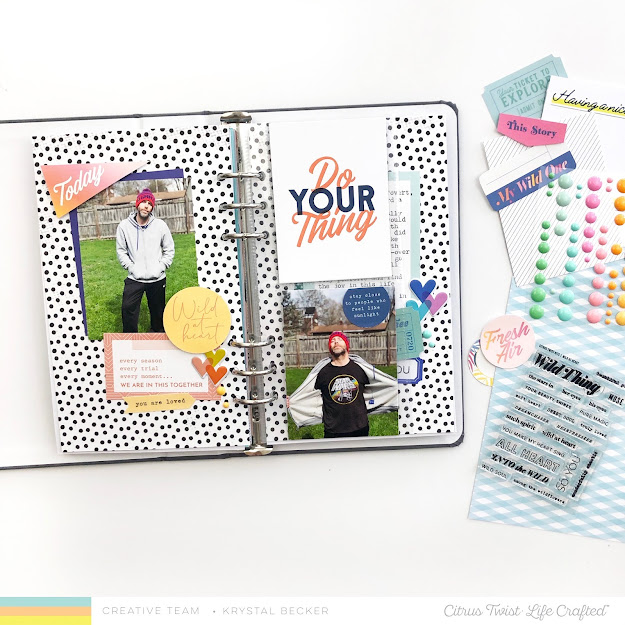
Hi everyone! This is Krystal, and today I'm sharing a page in my Life Crafted Album. I used the July "Wild At Heart" Life Crafted Kit and the July Scrapbooking Add-on for this spread, and I love all the bright colors!


I started with a neutral background, since I knew I'd be using lots of colors on this one. I also added an insert between my pages so that I would have room for all three of the photos I wanted to include, plus my journaling. 


Then I went through the embellishments in both kits to find things that would work well with my story. I chose items in two different color ways and divided the pages in two halves based on those colors. 


For the left side of my spread, I chose mostly warm tones of yellow and orange, with a bit of blue added in for contrast. I based these colors off of the "Do Your Thing" journaling card.


For the right side of my spread, I choose tones of blue and green, sticking to mostly cooler colors. Once again, I based these colors on the "Wild at Heart" journaling card. 


I added all of the elements at slight angles down the page to bring some movement to what would otherwise be a very blocky design. Adding a few circles, hearts, and dots also helps to break up all of the angles. 


You can see the full process of how this page came together in the video below. 


I hope you found some inspiration for using your kits this month, and I hope to see you back here soon!